A trading bot is a program that automatically opens and closes trades based on predefined rules. The bot doesn’t sleep, doesn’t get tired, and doesn’t succumb to emotions. But it can quickly drain your deposit if set up incorrectly.
This guide covers everything a beginner needs: from choosing a bot to first profits.
What Is a Trading Bot and Why You Need It
A trading bot is a script that connects to an exchange via API and trades for you.
Advantages:
- ✅ 24/7 without breaks — bot doesn’t sleep
- ✅ No emotions — follows rules, doesn’t panic
- ✅ Speed — reacts in milliseconds
- ✅ Scalability — can trade on 10+ pairs simultaneously
Disadvantages:
- ❌ Technical risks — bugs, API outages, errors
- ❌ Market risks — bot doesn’t predict black swans
- ❌ Complexity — need to understand strategy and settings
Conclusion: A bot is a tool, not a “money button”. Without understanding the strategy, it will drain your deposit.
Types of Trading Bots
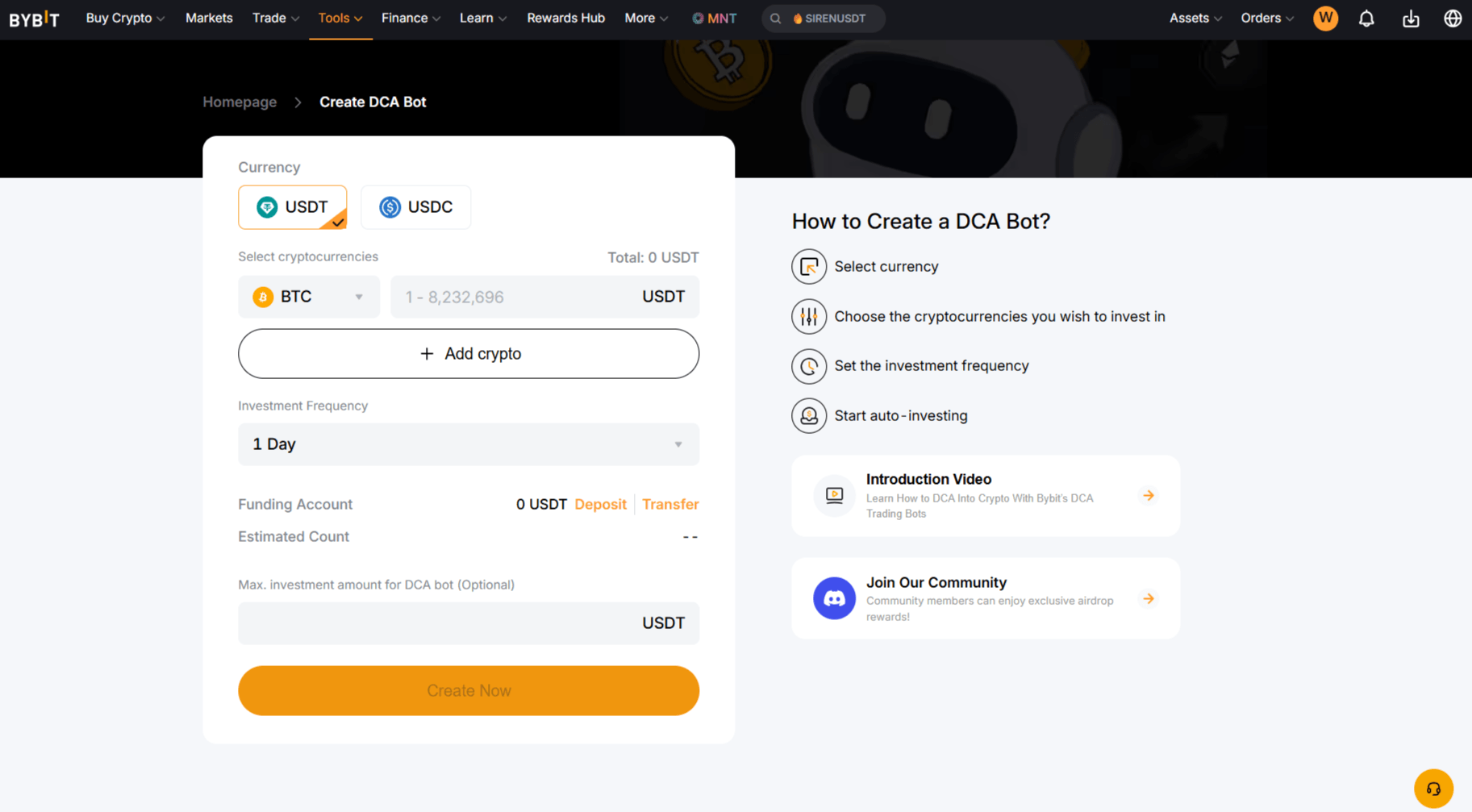
1. DCA Bot (Dollar Cost Averaging)
How it works: Buys an asset at regular intervals for a fixed amount.
Example:
- Buy ETH worth $100 every Monday
- Price doesn’t matter — amount is fixed
Pros:
- ✅ Averages entry price
- ✅ No need to time the market
- ✅ Works long-term
Cons:
- ❌ Slow profits
- ❌ Doesn’t work in sideways (no trend)
For whom: Conservative investors, long-term accumulation.
Examples:
- Bybit DCA Bot
- Veles DCA Strategy
- 3Commas DCA
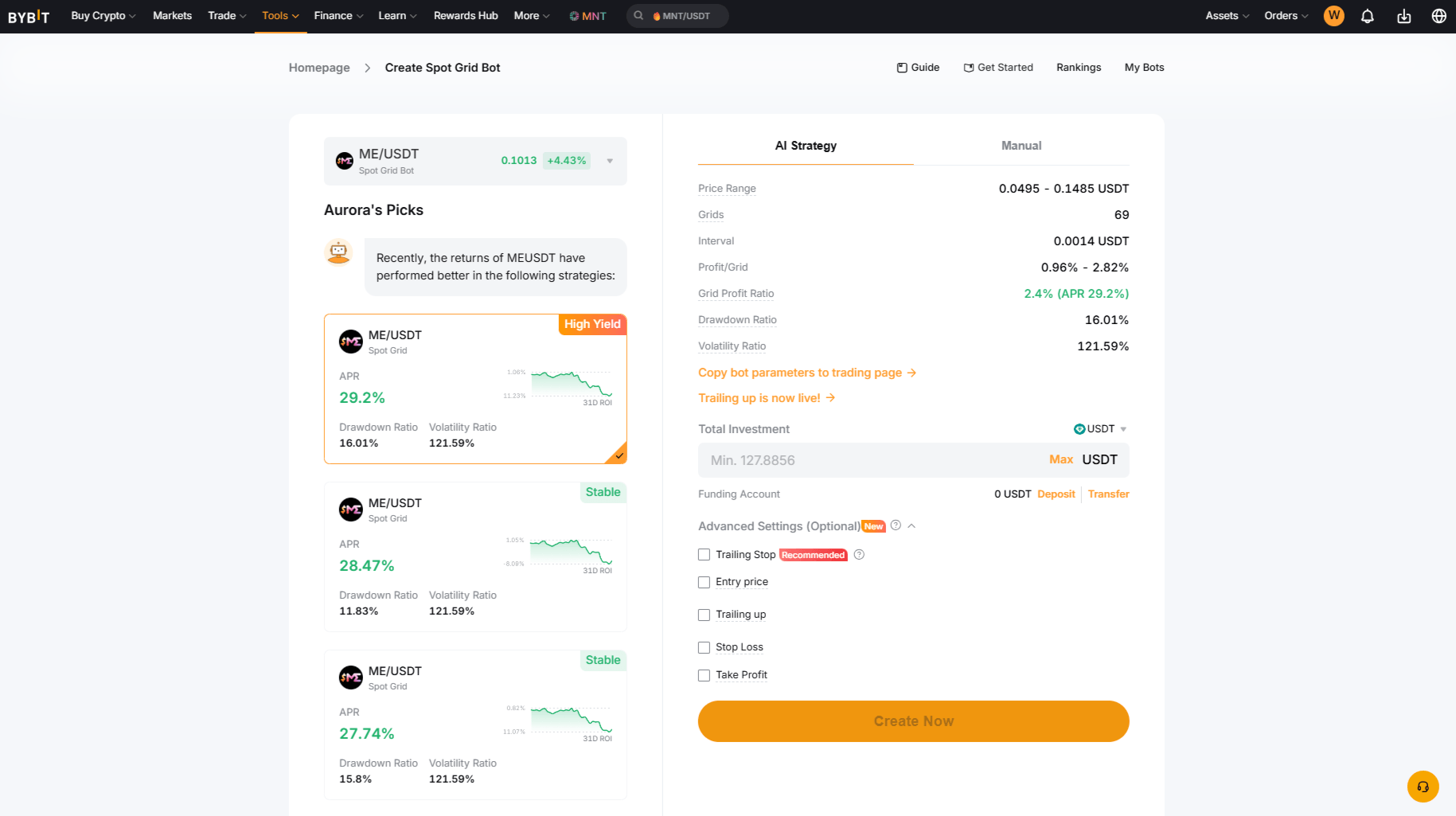
2. Grid Bot (Grid Trading)
How it works: Creates a grid of orders within a price range. Buys at support, sells at resistance.
Example:
- Range: $2000–$3000 (ETH)
- Grid step: $100
- Bot buys at $2000, $2100, $2200… and sells at $2900, $2800, $2700…
Pros:
- ✅ Works in sideways
- ✅ Constant profits (small but frequent)
- ✅ No need to predict direction
Cons:
- ❌ Losses on strong trends (price leaves the range)
- ❌ Requires large deposit (many orders)
For whom: Traders who trade in sideways.
Examples:
- Bybit Grid Bot
- Veles Grid Strategy
- Pionex Grid Trading
3. Arbitrage Bot
How it works: Buys on one exchange, sells on another (price difference).
Example:
- BTC on Bybit: $95,000
- BTC on BingX: $95,200
- Bot buys on Bybit, sells on BingX → profit $200
Pros:
- ✅ Low risk (no market risk)
- ✅ Fast profits
Cons:
- ❌ Need accounts on multiple exchanges
- ❌ Commissions eat profits
- ❌ Hard to find arbitrage (competition)
For whom: Experienced traders with large capital.
Examples:
- HaasOnline
- Cryptohopper
- Custom bots
4. Market-Making Bot
How it works: Places limit orders to buy and sell simultaneously. Earns on the spread.
Example:
- Bid: $95,000 (buy)
- Ask: $95,100 (sell)
- Spread: $100
Pros:
- ✅ Constant profits (if there’s volume)
- ✅ Low risk
Cons:
- ❌ Requires large deposit
- ❌ Risk on trends (price moves one way)
For whom: Professionals with large capital.
Examples:
- Hummingbot
- Bybit Market Making Bot
5. Signal Bot
How it works: Receives signals from indicators (RSI, MACD) and opens trades.
Example:
- RSI < 30 → buy (oversold)
- RSI > 70 → sell (overbought)
Pros:
- ✅ Works on trends
- ✅ Flexible setup
Cons:
- ❌ Many false signals in sideways
- ❌ Requires fine-tuning
For whom: Traders who understand technical analysis.
Examples:
- Veles Prisma Strategy — detailed review with backtests and settings
- 3Commas Signal Bot
- Custom bots on Pine Script
How to Choose a Bot: Checklist
Check before launching:
- Strategy clear? — if not, don’t launch
- Backtests available? — check on history
- Deposit sufficient? — minimum $100 for DCA, $500 for grid
- Commissions accounted for? — bot should cover commissions
- Risks understood? — how much can you lose
Red flags:
- ❌ “Guaranteed profit 10% per day”
- ❌ “No backtests”
- ❌ “Secret strategy” (developer doesn’t disclose logic)
- ❌ “Requires deposit from $10,000”
Step-by-Step Bot Setup (Using Bybit as Example)
Step 1: Registration and Deposit
- Register on Bybit
- Complete KYC (verification)
- Make a deposit (minimum $100 for DCA)
Step 2: Choosing a Strategy
For beginners:
- DCA — conservative, low risk
- Grid — medium, moderate risk
For experienced:
- Signal bot — high risk, high profit
Step 3: Setting Parameters
DCA:
- Pair: ETH/USDT
- Amount: $100
- Interval: 1 week
- Duration: 3 months
Grid:
- Pair: ETH/USDT
- Range: $2000–$3000
- Step: $100
- Number of orders: 10
Step 4: Launch and Monitoring
- Click “Launch”
- Check the bot once a day
- Don’t interfere unnecessarily (let the strategy work)
Step 5: Profit Withdrawal
- Set up automatic profit withdrawal (if available)
- Or withdraw manually once a week
Risks and How to Reduce Them
1. Market Risk
Problem: Price moves against the bot.
Solution:
- Stop-loss (automatic closure at loss)
- Diversification (multiple bots on different pairs)
2. Technical Risk
Problem: Bot breaks, API disconnects.
Solution:
- Choose reliable platforms (Bybit, Veles)
- Check bot logs
- Have a backup plan (manual closure)
3. Liquidity Risk
Problem: Can’t close position (no buyers).
Solution:
- Trade only on top exchanges (Bybit, BingX, Bitget)
- Avoid illiquid pairs
4. Commission Risk
Problem: Commissions eat profits.
Solution:
- Choose exchanges with low commissions (Bybit: 0.1%)
- Use limit orders (lower commission)
Beginner Mistakes
❌ Mistake 1: “Money Button”
Problem: Beginner thinks the bot will print money without effort.
Reality: A bot is a tool. Without understanding the strategy, it will drain the deposit.
Solution: Study the strategy before launching.
❌ Mistake 2: Too Large Deposit
Problem: Beginner invests $10,000 in the first bot.
Reality: The first bot can drain the deposit (testing).
Solution: Start with $100–500. Increase deposit gradually.
❌ Mistake 3: No Stop-Loss
Problem: Bot trades without limiting losses.
Reality: One losing trade can drain the entire deposit.
Solution: Always set stop-loss (max loss 5–10% of deposit).
❌ Mistake 4: Frequent Interference
Problem: Beginner constantly changes bot settings.
Reality: Strategy doesn’t have time to work.
Solution: Let the bot work for at least a week without interference.
❌ Mistake 5: No Diversification
Problem: Entire deposit in one bot on one pair.
Reality: If the pair goes into loss, the entire deposit is at risk.
Solution: 3–5 bots on different pairs (BTC, ETH, SOL).
Bot Trading Psychology
Main problem: Emotions prevent the bot from working.
😰 Fear of Loss
Symptom: You close the bot at the first drawdown.
Reality: A 10-20% drawdown is normal for a bot.
Solution:
- Accept drawdown as part of the strategy
- Don’t close the bot early (give it 2-4 weeks)
- Look at monthly results, not daily
😎 Greed
Symptom: You increase deposit after first profit.
Reality: After profit can come a drawdown.
Solution:
- Increase deposit by 10-20% per week
- Don’t add money after 1-2 profitable days
- Wait for stability (2 weeks without losses)
😐 Boredom
Symptom: You check the bot every 5 minutes.
Reality: The bot works autonomously. Frequent checking = stress.
Solution:
- Check the bot 1-2 times a day
- Set up Telegram notifications
- Do other things (bot doesn’t require attention)
😡 Anger at the Bot
Symptom: You blame the bot for losses.
Reality: The bot follows the strategy. Losses are part of trading.
Solution:
- Analyze the strategy, not the bot
- Do backtests before launching
- Take responsibility for settings
🤔 Distrust
Symptom: You don’t trust the bot, interfere with its work.
Reality: The bot doesn’t succumb to emotions. It executes code.
Solution:
- Trust the code (open source)
- Test on demo before launching
- Give the bot time (minimum 2-4 weeks)
Conclusion: A bot requires discipline. Follow the rules, don’t succumb to emotions.
Backtests: Testing Strategy on History
⚠️ Important: Backtests don’t guarantee future profits. The market changes, the strategy may work worse.
What is a backtest: Running a strategy on historical data.
Why: To find out how the strategy would have worked in the past.
Where to do it:
- Bybit (built-in backtester)
- Veles (backtests for all strategies)
- TradingView (Pine Script)
How to interpret:
- Profit: > 20% per year — good
- Drawdown: < 20% — normal, > 40% — risky
- Number of trades: > 50 — statistically significant
Example (Veles Prisma 5.5):
- Period: 1 year
- Profit: +145%
- Drawdown: -18%
- Trades: 342
Conclusion: Strategy works, drawdown is normal.
Bot Platforms
| Platform | Type | Deposit | Commission | For Whom |
|---|---|---|---|---|
| Bybit | Built-in bots | $100 | 0.1% | Beginners |
| Veles | Cloud bots | $50 | 0.1% | Beginners / Intermediate |
| Ginarea | Bot builder | $0 | 0% (affiliate) | Beginners / Advanced |
| 3Commas | SaaS | $0 | $29/month | Intermediate |
| Cryptohopper | SaaS | $0 | $29/month | Intermediate |
| Hummingbot | Custom | $1000+ | 0% | Professionals |
| HaasOnline | Custom | $500+ | 0.05% | Professionals |
Recommendation for beginners: Bybit or Veles (built-in bots, low entry threshold). For more control — Ginarea (builder with free tier).
Summary
Key takeaways:
- A bot is a tool, not a “money button”
- Start with DCA or grid (low risk)
- Always do backtests before launching
- Set stop-loss (max loss 5–10%)
- Diversify (3–5 bots on different pairs)
Next step: DCA Strategy: Detailed Guide — how averaging works.
FAQ
What is a trading bot in simple terms?
A trading bot is a program that automatically trades on an exchange based on predefined rules. You set up the strategy, the bot opens and closes trades without your participation.
Do I need to constantly monitor the bot?
No. The bot works autonomously 24/7. Check once a day, but don’t interfere unnecessarily. Exception — emergency situations (strong trend, news).
How much money is needed to launch a bot?
Minimum:
- DCA: from $100
- Grid: from $200
- Arbitrage: from $500
- Market-making: from $1000
Which bot to choose for a beginner?
Start with DCA or grid on Bybit/Veles. These are simple strategies with low risk. Don’t use arbitrage and market-making without experience.
Will a bot guarantee profit?
No. A bot is a tool, not a “money button”. Profit depends on strategy, settings, and market conditions. There’s always a risk of loss.
What is drawdown and what’s normal?
Drawdown is the maximum deposit decline from a peak. Normal: < 20%. If drawdown > 40%, the strategy is too risky.
Can I lose more than the deposit?
In spot trading — no (max loss = deposit). In futures with leverage — yes, if there’s no stop-loss. Always use stop-loss.
Disclaimer
This blog is for informational purposes only. It does not constitute financial or investment advice.
Trading cryptocurrencies and other financial instruments involves high risk. You may lose all your funds.
The author is not responsible for any financial losses resulting from the use of information from this blog.